
Texaco
Chevron U.S.A. Inc.Maps & Navigation
4.7470.00 Reviews
- Version
- Varies With Device
- Installs
- 100.00K
- Age Rating
- Everyone
Screenshots

Our Review of Texaco
 Analysis by Appyee
Paying for fuel without leaving the driver’s seat sounds simple, and that is the central appeal of Texaco. I reviewed this free Maps & Navigation app from Chevron U.S.A. Inc. with a practical question in mind: does it make a normal fuel stop less awkward, or does it add another layer of setup to an already familiar routine? My answer is mostly positive, but with an important condition: it is most useful when you prepare it before you are parked at the pump.
The app is built around fuel payment rather than broad trip planning. That focus makes it easier to understand than a full navigation suite, but it also means you should not expect it to replace your preferred maps app for routes, traffic, or discovering every type of roadside service. Its strongest moment is the short window between pulling into a Texaco location and starting the pump. When that handoff works smoothly, staying in the car is genuinely convenient.
Where the fuel-payment experience can get stuck
The first point of friction is expectation. A person may install Texaco thinking it will behave like a general-purpose navigation tool because it sits in the Maps & Navigation category. In practice, its identity is much narrower: it is a fuel-payment companion for Texaco stops. I found it helpful to think of it as a checkout tool that happens to be used at a gas station, not as a replacement for a map, route planner, or fuel-price comparison service.
That distinction matters when you are already at the pump. If you are trying to find a station, confirm that the location supports the app’s payment flow, sign in, and complete a transaction while other cars are waiting behind you, every small delay feels larger. The best workflow is to do the account and payment preparation at home, then use the app only for the final station interaction.
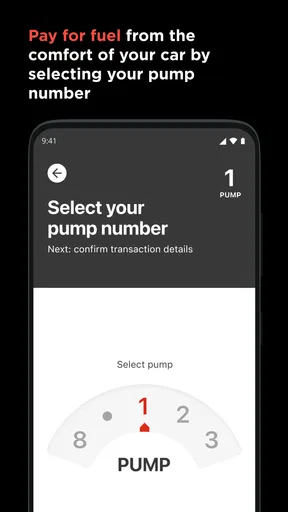
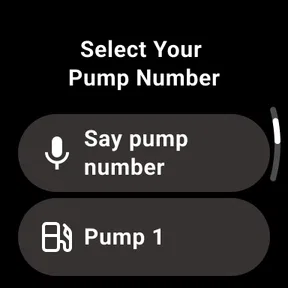
Another common sticking point is the physical environment. A fuel station is noisy, bright, and full of distractions. It is easy to select the wrong pump, misread a prompt, or assume the app has completed a step when the pump itself is still waiting. I recommend pausing long enough to match the pump number shown in the app with the number printed on the dispenser. That simple check is more valuable than rushing through the screens.
The app can reduce the need to handle a card at the pump, but it cannot remove the need to verify the pump and transaction. I would never treat a payment screen as proof that fuel is flowing. Look at the dispenser, follow its instructions, and wait for the transaction to finish before pulling away.
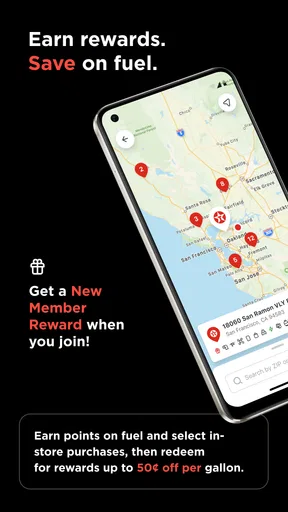
Location-related confusion can also make the app appear broken. If you are near several Texaco stations, or if the station layout is large, the app may need you to identify the correct place rather than simply assuming the nearest visible sign is the one you intend to use. Before confirming anything, compare the station shown in the app with the address or surroundings you can see from the car.
There is also a practical trade-off for passengers and families. Paying from inside the vehicle is especially useful when a child is asleep, when the weather is unpleasant, or when getting out of the car is inconvenient. However, if you are already standing beside the pump and your physical payment is ready, opening an app may be slower than using the usual method. Texaco is not automatically the fastest choice for every stop; its value increases when staying in the car solves a real problem.
What I check before arriving at the station
I start with the account rather than the pump. I make sure I can open the app normally and that I am signed in before driving. This avoids attempting account recovery in a parking space with a low battery, weak signal, or impatient passengers. I also keep the device unlocked and within reach, while still leaving the phone safely parked when the car is moving.
Next, I review the payment setup inside the app. I do not wait until the pump is asking for authorization to discover that a payment method needs attention. A good habit is to open Texaco before the trip, confirm that the account is ready, and close it only after I know I can return to the relevant screen quickly.
I also check the station context. The app’s purpose is tied to Texaco fueling, so I do not assume that any nearby fuel station will offer the same experience. If I am taking an unfamiliar route, I use my normal navigation app to plan the journey and reserve Texaco for the payment step. Keeping those jobs separate makes the whole process less confusing.
The release date was May 15, 2019, and the app has had time to become a familiar option for people who regularly use Texaco locations. Its average rating is 4.7 from around 3.9 thousand ratings, which suggests that the basic idea works well for many users. I treat that as encouraging rather than conclusive, because payment apps are highly dependent on the individual station, phone, account state, and network connection.
Before a first real-world attempt, I would do a low-pressure rehearsal. Open the app, look through the available screens, and identify where the station and payment actions appear. I would not begin by experimenting at a busy pump. The goal is not to memorize every button; it is to remove the uncertainty that causes people to tap repeatedly or abandon the process halfway through.
It is also worth deciding in advance what you will do if the app is unavailable. Carrying a normal payment alternative is sensible for any mobile payment service, especially when fuel is essential. This is not a criticism unique to Texaco. A phone can lose signal, run out of power, or fail to authenticate at the exact moment you need it.
For privacy-conscious users, preparation has another benefit: you can review what you are about to use while you are calm, rather than making hurried decisions at the pump. I prefer to keep the app’s role limited to the transaction and use my established navigation tool for everything else. That separation gives me a clearer mental model of what the app is doing.
A reliable workflow when the first attempt fails
If the transaction does not begin, I avoid tapping the payment action repeatedly. Repeated attempts can make it harder to tell whether the original request is still processing or whether a second request has been started. I first check the selected station and pump number, then look for a clear status change in the app or on the dispenser.
If the app seems frozen, I move through basic recovery in a controlled order. I check whether the phone still has a connection, return to the app once, and reopen the relevant screen if necessary. I avoid switching between several payment apps at once because that makes it difficult to know which service currently has the transaction in progress.
When the pump does not respond, I inspect the pump itself. Is it waiting for a physical card, displaying an instruction, or showing that another transaction is active? The app cannot correct a pump that has not reset properly or a dispenser that is temporarily unavailable. If the pump is clearly not ready, moving to another available pump or asking station staff is more practical than continuing to force the same screen.
One useful recovery habit is to record the pump number mentally before opening the app. In a busy station, it is surprisingly easy to walk back to the car, select the wrong number, and then blame the payment process. Matching the app selection to the dispenser is a small action, but it prevents one of the most avoidable errors in this kind of workflow.
If a payment appears uncertain, I do not immediately start another attempt. I check the app and the pump for a completed, canceled, or pending indication, then keep any on-screen confirmation available. When money is involved, patience is safer than guessing. If the status remains unclear, station staff are the right people to involve because they can see the physical pump and the station’s own transaction state.
Another realistic scenario is a family road trip. I pull into a Texaco station while a child is sleeping in the back seat, open the app, select the correct location and pump, and keep the process focused on the fuel purchase. If the station is busy or the connection is unreliable, I use the backup payment method instead of turning a five-minute stop into a troubleshooting session. The app is valuable here because it offers a convenient first choice, not because it guarantees that every stop will be frictionless.
For commuters, the best use is repetition. If you visit the same Texaco station regularly, you already know its layout and pump numbering, so the app can become a quick routine. For occasional travelers, the benefit is less predictable because unfamiliar station layouts and account questions are more likely to appear at the same time.
When the app is not the real cause of the problem
Mobile fuel payment depends on more than the application itself. A weak mobile connection can interrupt communication between the phone, the service, and the station. A nearly empty phone battery can make a perfectly functioning account useless. A busy station system, a pump reset issue, or a payment authorization problem can also create symptoms that look like an app failure.
I therefore separate the problem into three questions: can I open the app, can the app identify the intended station and pump, and can the physical dispenser authorize and start the purchase? If the first answer is no, I begin with the phone and account. If the second answer is no, I verify location and pump selection. If the third answer is no, I look at the dispenser or ask station staff.
This approach prevents a common mistake: uninstalling and reinstalling the app when the real issue is a station-side delay or a payment method that needs attention. Reinstallation can also create extra sign-in work at the worst possible moment. I would only consider more drastic phone troubleshooting after the simple checks have been completed.
The app is free and rated for Everyone, which makes it approachable for a wide range of drivers. Free access is helpful, but it should not be confused with a promise that every part of the fuel stop will be free of conditions or verification. Payment services still require careful handling, and I would explain the workflow to a less technical family member before asking them to rely on it alone.
Texaco has more than one hundred thousand installs, so it is not an obscure experiment. That level of adoption gives me more confidence that the core concept is established, while still leaving room for station-by-station differences. A strong rating and a meaningful user base are useful signals, but my recommendation remains conditional on whether you actually visit participating Texaco locations often enough to benefit.
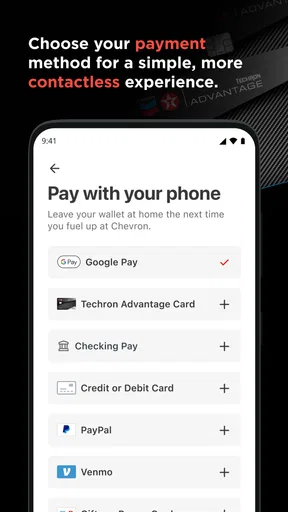
This is where the comparison with usual alternatives becomes important. A physical card is usually more universal and does not depend on a charged smartphone. A digital wallet may already be faster for someone who has a compatible setup and prefers not to maintain a separate fuel app. A general navigation app is better for finding routes, traffic information, and destinations beyond the payment step. Texaco makes the most sense when its specific car-based payment flow is more convenient than those alternatives at the stations you use.
I would skip it if you rarely stop at Texaco, dislike creating separate accounts for individual retailers, or want one app to manage every brand and every part of a journey. I would also avoid relying on it as the only payment option during a long drive. The app is a focused convenience, not a universal replacement for a card, a wallet, a map, or station assistance.
Who gets the most value from the focused design
Regular Texaco customers are the clearest audience. The more familiar you become with the app and your usual station, the less time you spend thinking about the mechanics. Drivers who prefer to remain in the car may also appreciate it, particularly during rain, extreme heat, or situations where leaving the vehicle is inconvenient.
It can also help people who want a more deliberate fuel-stop routine. Instead of taking out a wallet, handling a card, and returning to the car, they can prepare the purchase from the driver’s seat. That does not remove the need to pay attention, but it can make the stop feel more contained and predictable.
On the other hand, a driver who wants live traffic, turn-by-turn directions, broad station discovery, loyalty management across several brands, and flexible payment choices should look beyond this app. Texaco’s narrow purpose is a strength when you want exactly that purpose, and a limitation when you expect a complete travel toolkit.
Chevron U.S.A. Inc. has kept the product identity straightforward: this is a Texaco-branded app whose main practical job is helping with fuel payment from the car. I prefer that clarity to an overloaded interface, but it means the app’s usefulness should be judged by the quality of that one workflow rather than by features it was never designed to replace.
My practical verdict after weighing convenience against friction
Texaco is worth installing if you regularly fuel at Texaco and want a prepared, in-car payment option. I like the idea because it addresses a real moment of inconvenience rather than trying to become another all-purpose driving dashboard. When the account is ready, the correct station and pump are selected, and the phone has a dependable connection, the experience can make a routine stop noticeably easier.
My recommendation comes with a simple operating rule: set it up before you need it, keep a backup payment method, and treat the pump as part of the transaction rather than assuming the phone controls everything. Those habits address most of the practical friction I would expect from a mobile fuel-payment workflow without pretending that every problem originates in the app.
The app was released in 2019, is free to use, and carries an Everyone age rating. Those details make it easy to try, but the decision should still come down to your driving pattern. If Texaco is a regular stop, the convenience can justify adding one more app to your phone. If you visit many fuel brands or already have a reliable wallet-based routine, the separate app may feel unnecessary.
Overall, I see Texaco as a useful specialist rather than an essential navigation download. It does one job, and that job can be genuinely helpful in the right circumstances. I would recommend it to a friend who frequently uses Texaco and values paying without leaving the car, while advising that friend to complete the setup calmly at home and keep a conventional alternative available for the occasional station, phone, or network problem.
Verdict
Strengths of Texaco
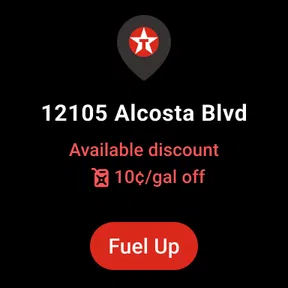
- Easy access to nearby Texaco stations and fuel prices
- Mobile payment can make fueling faster and more convenient
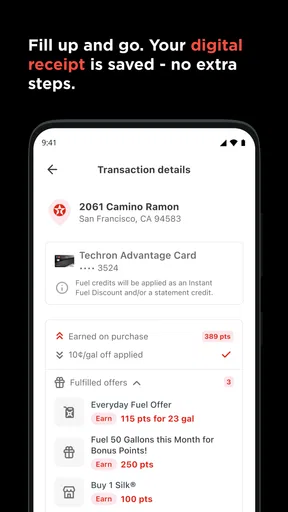
- Digital receipts help reduce paper use and track purchases
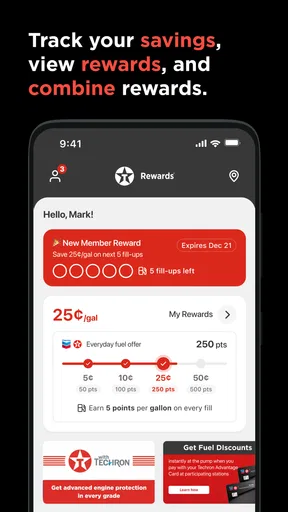
- Rewards features may provide savings on eligible purchases
- Station details can help users find available services
Limitations of Texaco
- Fuel prices and station information may not update instantly
- Rewards availability can vary by location and participating station
- The app may require location access for its main features
- Some users may experience sign-in or payment setup issues
- Coverage and features may be limited outside Texaco service areas
Other Releases by Chevron U.S.A. Inc.
View All
Chevron
Maps & Navigation4.8

ExtraMile®
Maps & Navigation4.8
Similar Picks in This Category
View All
Uber - Request a ride
Uber Technologies, Inc.4.7


inDrive. Rides with fair fares
® SUOL INNOVATIONS LTD4.8

Yandex Go: Taxi Food Delivery
Mikromobilnost LLC Belgrade4.8

Bolt: Request a Ride
Bolt Technology4.8

Rapido: Bike-Taxi, Auto & Cabs
Rapido Bike Taxi4.8
Frequently Asked Questions
What is the Texaco app used for?
The Texaco app is designed to make visits to participating Texaco service stations more convenient. Depending on your location, it may help you find nearby stations, check fuel prices, plan routes, view available services, access promotions, and manage loyalty or payment features. The exact tools can vary by country, so users should review the app description and supported features in their region before downloading.
Can I use the Texaco app to pay for fuel?
Some versions of the Texaco app support mobile fuel payments, allowing eligible users to select a station, choose a pump, and complete a transaction through the application. However, payment availability depends on the country, station, account setup, and supported payment methods. Before relying on this feature, check whether your preferred Texaco location participates and whether your bank card or digital wallet is accepted.
Does Texaco offer rewards, discounts, or loyalty benefits through the app?
The Texaco app may include loyalty programs, promotional offers, digital coupons, or rewards for eligible customers. Benefits differ considerably between markets and can change over time, while some offers may require registration, a verified account, or use at participating stations. Read the terms of each promotion carefully, especially expiration dates, fuel restrictions, minimum purchases, and whether rewards can be combined.
Is the Texaco app available for both Android and iPhone?
Texaco applications may be available for Android and iOS, but the exact app name, publisher, supported operating systems, and features can differ by country. Download the application only from Google Play or the Apple App Store, and confirm that the developer information matches the official Texaco brand. Older phones may not support the latest version, so check compatibility before installing.
Does the Texaco app require an account, location access, or personal information?
Certain features may work without registration, such as browsing basic station information, but services like rewards, personalized offers, transaction history, or mobile payments generally require an account. Location access can help identify nearby stations and provide navigation, while payment features may request additional personal or financial details. Review the privacy policy and permission requests, and disable optional access you do not need.
